Every Spot, Every Cue,
One App.

SpotPlot is followspot paperwork for lighting designers. Build your spots, gels, scenes and cue list once, then print clean spot sheets and caller sheets in seconds.

For Macs with Apple silicon

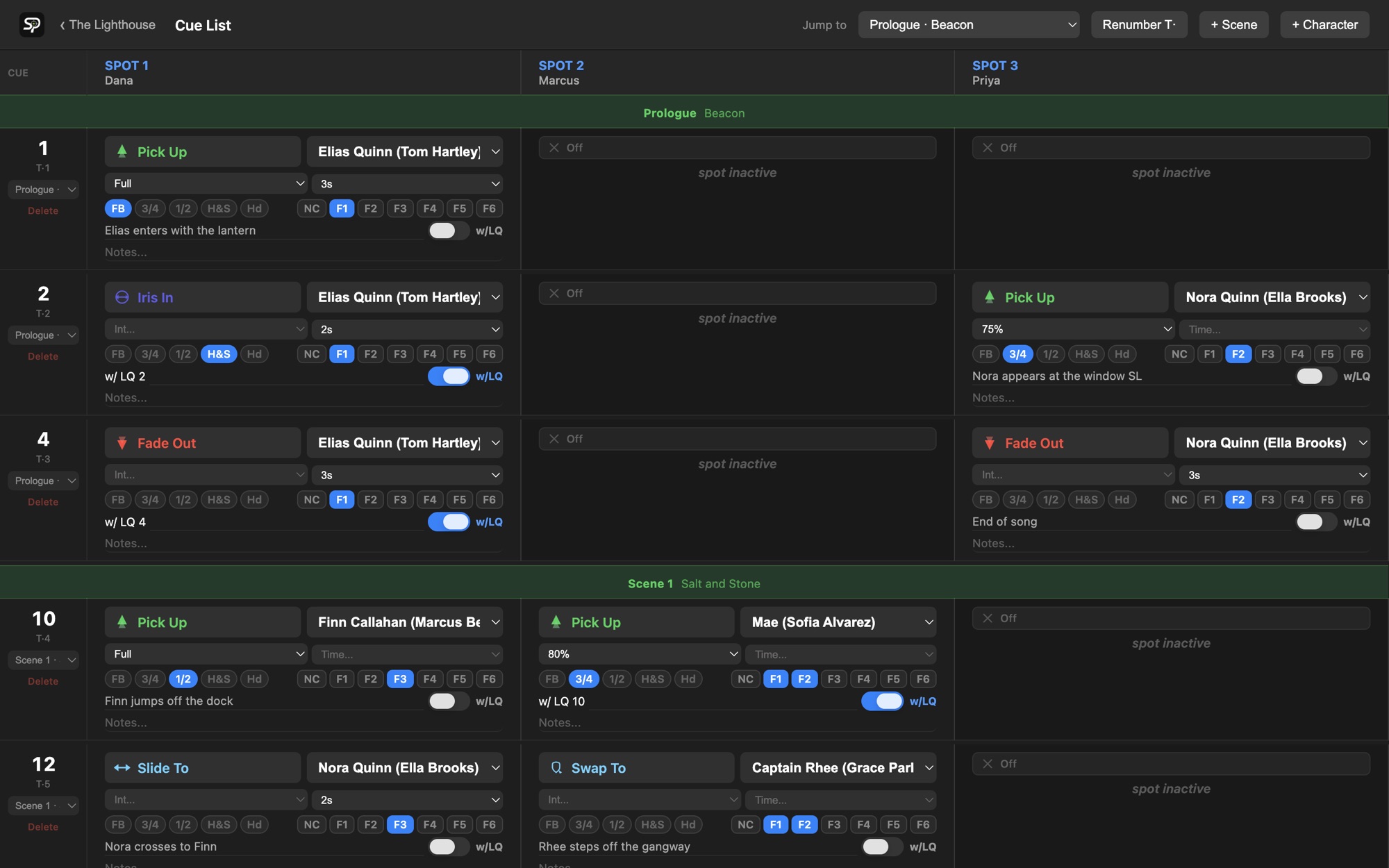
SpotPlot's cue list: one row per light cue, with a column for each followspot showing its action, character, iris, color frames and notes.

Built by lighting designers

Everything the spot plot needs. Nothing it doesn't.

SpotPlot replaces the spreadsheet: one place for every spot, gel and pickup, and paperwork that's always up to date.

The whole show, one row per cue.

Every light cue gets a row, and every followspot gets a column. Fill in each spot's part in a couple of clicks.

  • Pick Up, Fade Out, Swap To, Iris In, Ballyhoo and more, or make your own actions
  • Character, intensity, iris size, color frames and fade time
  • Highlight a cue or just its When or Notes line, and write spot notes for operators
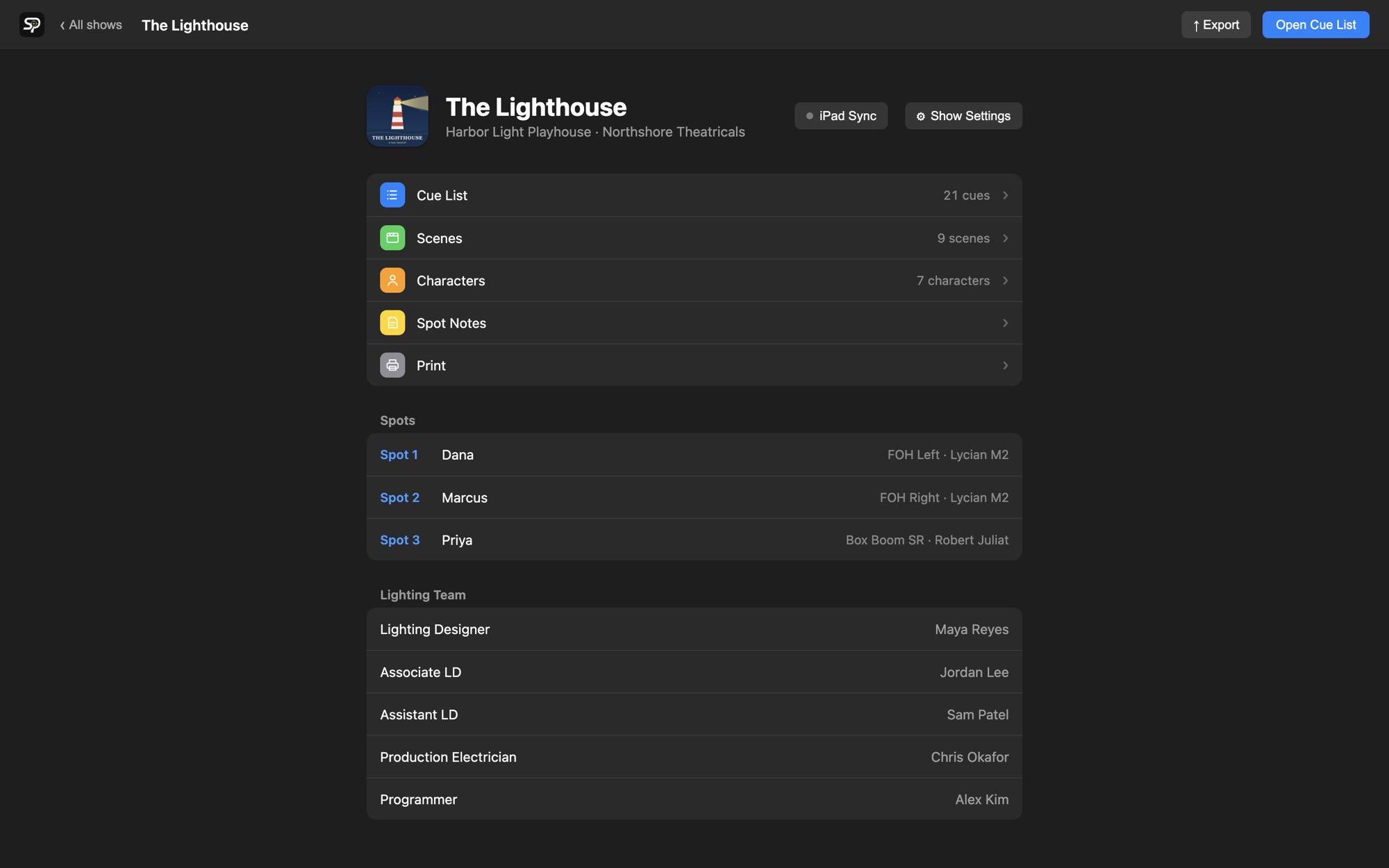
A show's dashboard in SpotPlot, listing the cue list, scenes, characters, spot notes and printing, with each spot's operator, position and fixture.

A caller sheet you can read in the dark.

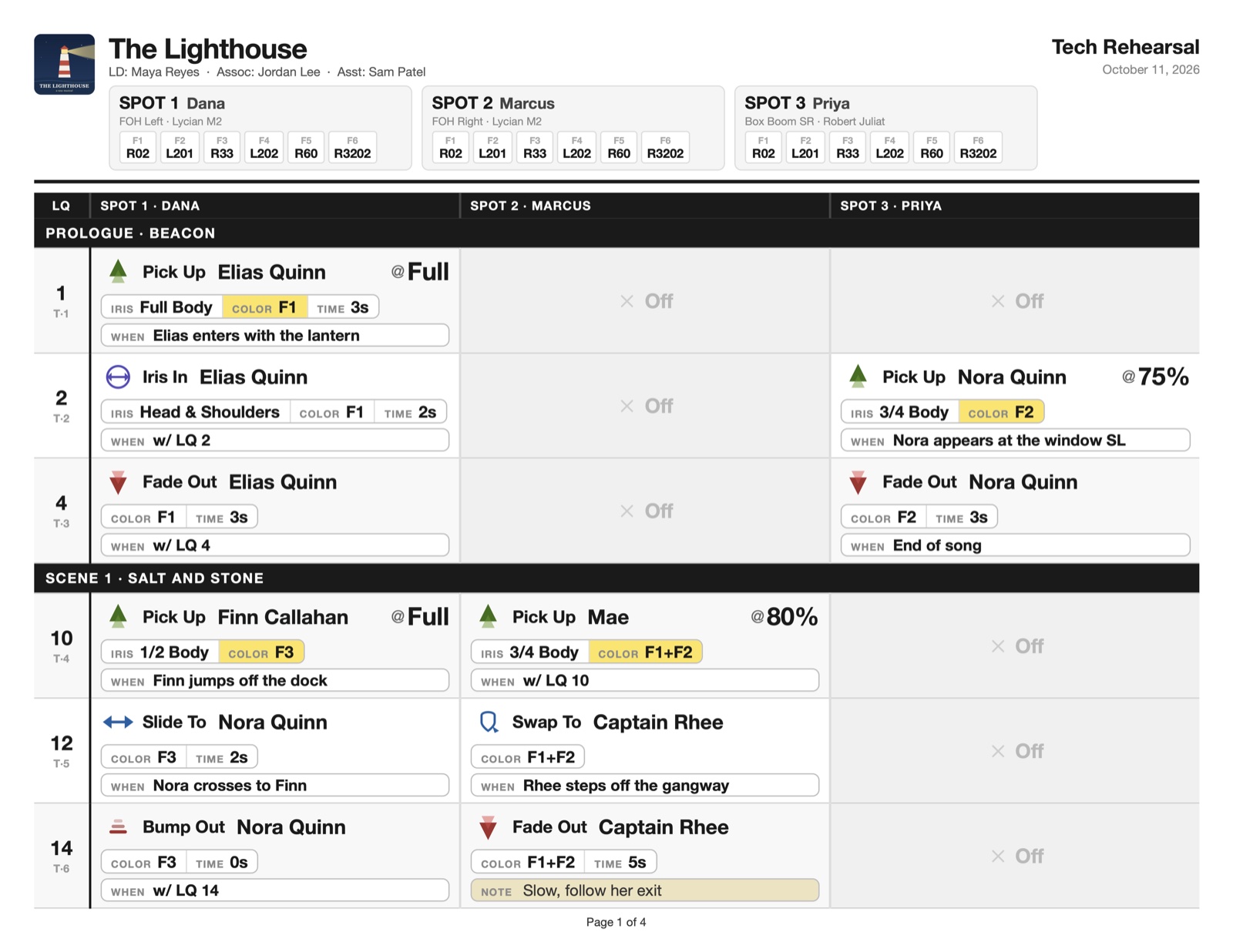
All spots side by side, cue by cue. Iris, color and time sit in one clean strip, and When and Notes get their own box.

A printed SpotPlot caller sheet with three spots side by side, cue by cue, and color changes highlighted in yellow.

A spot sheet for every operator.

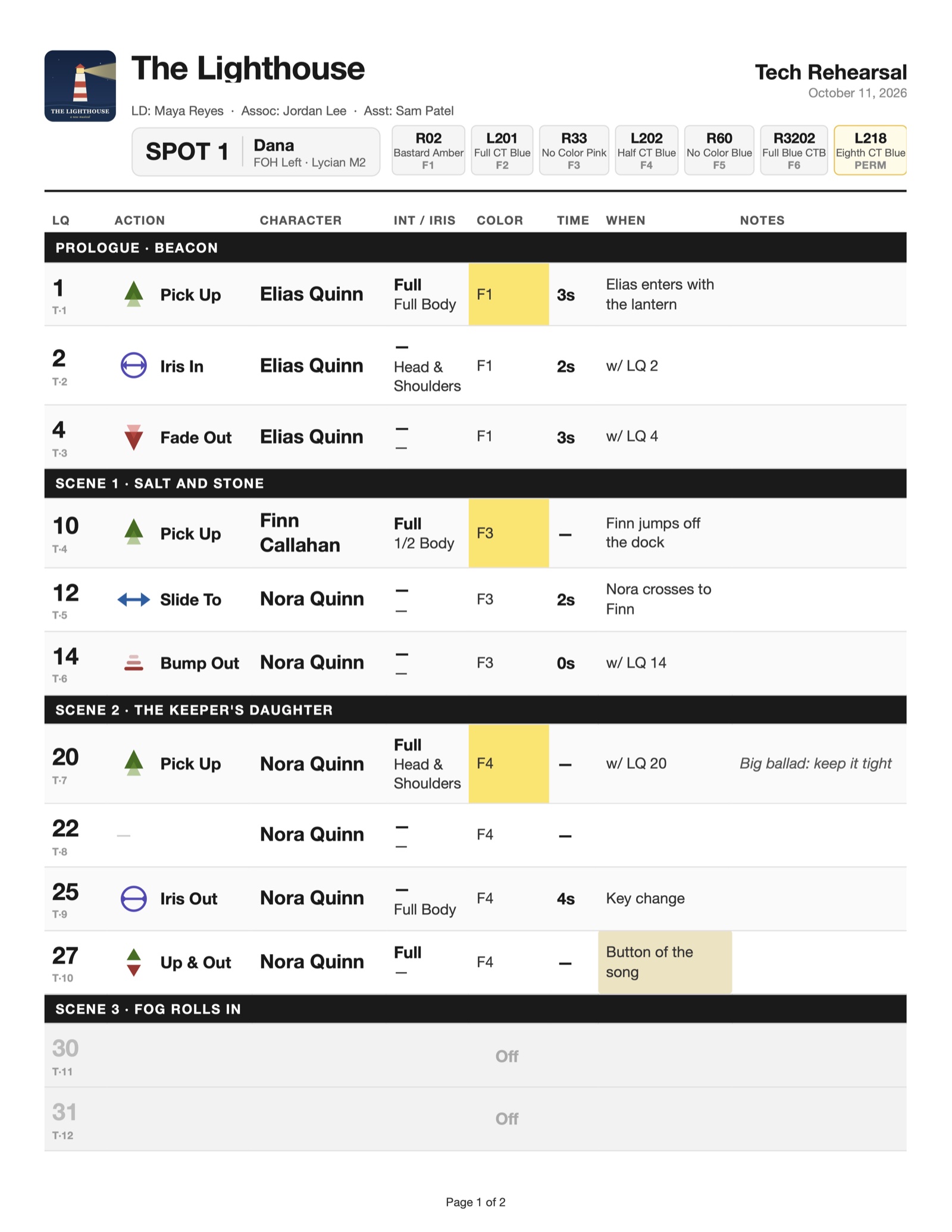
Each operator gets their own sheet with their gel load across the top and only what they need, cue by cue.

  • Hide Off cues or tracked cues, or print just a range of cues
  • Add a label like "2-24 Dress Run" to the header
  • A live preview shows exactly what will print before you export
A printed SpotPlot spot sheet for Spot 1, with the gel load across the top and each cue's action, character, iris, color and timing.

Know who you're picking up.

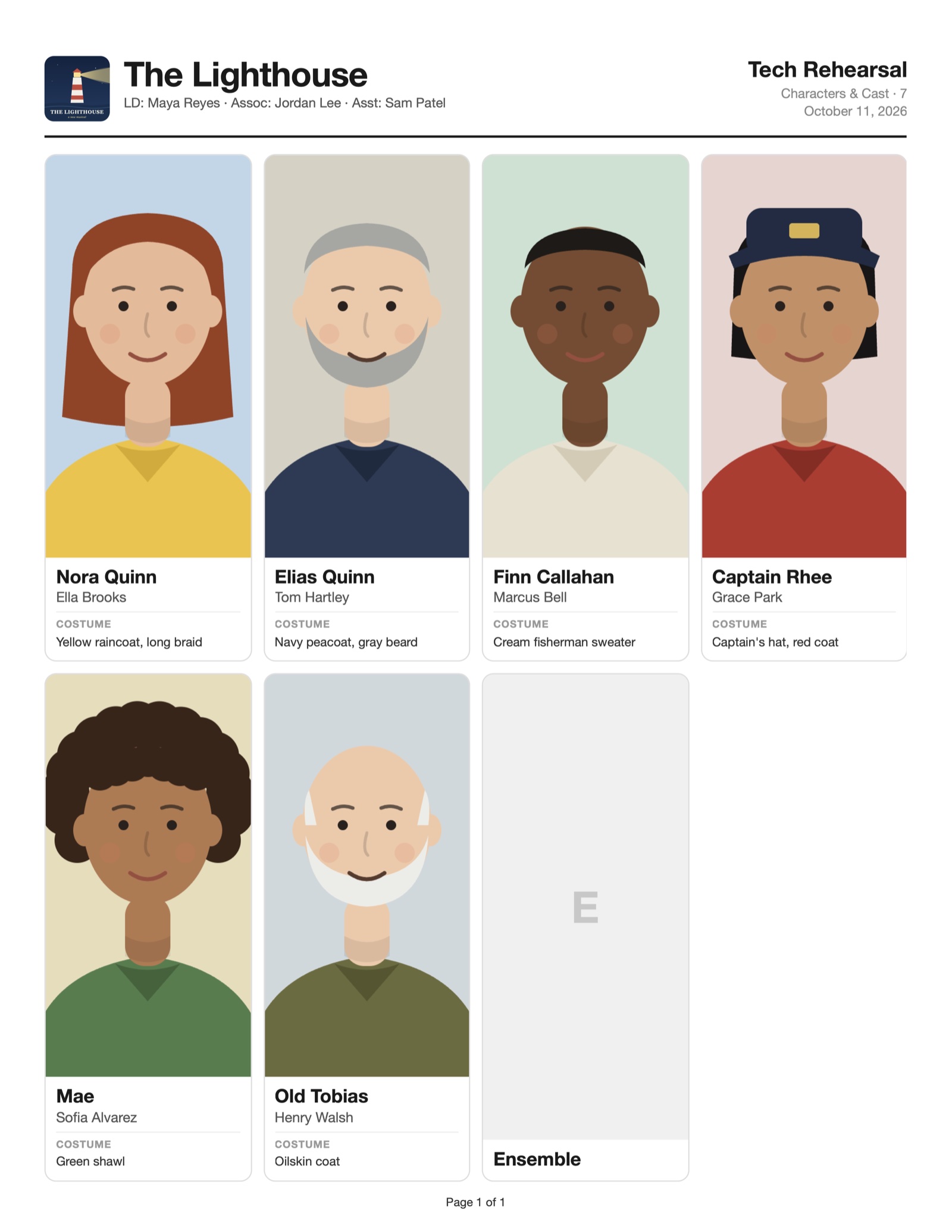
Add the cast with photos, actor names and costume notes. Characters fill the picker in every cue, and the cast sheet prints on a single page for the spot booth.

A printed SpotPlot cast sheet with a photo, actor name and costume note for each character.
🎨

Color loads

Every spot's gel frames on one sheet, with real gel names from the Rosco, Lee and GAM catalogs, plus permanent color.

🎬

Scenes and acts

Group cues by scene and song. Headers stay pinned while you scroll, and act breaks stand out.

📝

Spot notes

Write notes to operators from any cue, check them off once given, and print them by spot.

↗

Share the show

Export a whole show (photos and logo included) as one .spotplot file. Your associate double-clicks it to open.

⚙︎

Make it yours

Custom actions with your own icons, custom iris sizes, spot order, and which cue details show on screen and on paper.

⌘

Made for Mac

A native-feeling Mac app with keyboard shortcuts, undo, automatic updates and tips that show you around.

Pricing

Simple plans. Full access.

Every plan includes every feature. Use SpotPlot on up to 2 Macs.

Student

For students with a .edu email

$8 / month

or $72 / year Save 25%

  • 1 user, 2 Macs
  • Full access to everything
  • Requires .edu email verification
Coming soon
Coming soon

Production

One flat fee per show. Covers the designer and every operator.

  • 2 Macs per spot, plus 2 for the design team
  • Tied to one show, for its run (up to 12 months)
  • Bought by the production, LD or PE
Coming soon

Education

For schools and training programs

  • Seats for your students and faculty
  • Tied to your institution's name and domain
  • Renews yearly
  • Students keep read-only access after graduating

Prices in US dollars. Subscriptions renew automatically and can be canceled any time.

Questions

Which Macs does SpotPlot run on?

Macs with Apple silicon (M1 or newer). SpotPlot isn't available for Windows or iPad yet; an iPad companion app for operators is in the works.

How many computers can I use it on?

Standard and Student plans work on 2 Macs at once, like a laptop and a desktop. A Mac that hasn't opened SpotPlot for 30 days frees up its spot automatically.

Do I need to be online?

No. SpotPlot works offline and checks your license whenever it can. Your shows are saved on your Mac.

Can I share a show with my associate or another designer?

Yes. Export the show from its dashboard (or press ⌘E) and send the .spotplot file. Everything comes along: cues, notes, highlights, photos and the logo. They double-click it to open it in SpotPlot.

How do I get updates?

SpotPlot updates itself. You can also choose SpotPlot → Check for Updates at any time.

More answers on the Support page, and everything about using the app in the Manual.

SpotPlot app icon

Get SpotPlot for Mac.

Download the app, then sign in with your license key. Licenses go on sale soon.

Requires a Mac with Apple silicon. Installation help